
Hookshot
Hookshot is an open-source application that brings The Legend of Zelda: Ocarina of Time (Nintendo Switch 2 version) to Windows and Linux computers as a native PC application. Unlike traditional emulators, Hookshot uses a process called static recompilation to translate the game’s code into a format that can run directly on your computer. This allows players to experience the adventure on modern PC hardware without running the original game through a console emulator.
With support for Windows, Linux, and Steam Deck, Hookshot offers several useful features, including customizable graphics settings, different resolution options, controller support, frame generation, and an in-game settings menu. You need to provide your own compatible copy of the game to build it on your computer. Whether you want to revisit the world of Hyrule or experience the game on a larger PC display, Hookshot provides an interesting new way to enjoy this classic adventure.
What Is Hookshot?
Hookshot is a free and open-source static recompilation application developed by NotRexed and the community. It is designed specifically for The Legend of Zelda: Ocarina of Time (Nintendo Switch 2 version). Instead of emulating the entire console environment, Hookshot translates the original game’s code into C and compiles it into a native Windows or Linux application.
The application also recreates the necessary console systems and handles graphics through Vulkan. This means the game is built locally on your computer using your own compatible game files. Once the building process is complete, you can launch the generated PC version without needing to repeat the entire process every time.
Hookshot is not a traditional emulator, and it does not include the original game, keys, or copyrighted game files. You must provide your own compatible copy. The application is actively developed, with improvements and new features being added over time.
Key Features of Hookshot
Native PC Performance
Hookshot converts the game’s code into a native PC application instead of running it through a traditional emulator. This approach allows the game to use your computer’s CPU and GPU directly through its native recompilation and Vulkan graphics systems.
Windows and Linux Support
Hookshot supports 64-bit Windows and Linux systems. It also provides a way to run the game on compatible Steam Deck devices, making it possible to enjoy the adventure on both desktop computers and handheld gaming hardware.
Custom Resolution Settings
Players can adjust the output resolution according to their display and hardware. This provides more flexibility when playing on standard monitors, high-resolution screens, or different display sizes.
Frame Generation Options
Hookshot offers frame generation options to make gameplay appear smoother. Depending on your hardware and configuration, you can choose different frame generation multipliers and adjust the settings to suit your display.
Upscaling Support
The application provides graphics options that can help improve visual quality or performance. Supported upscaling technologies include AMD FSR and NVIDIA DLSS options on compatible hardware.
Easy In-Game Settings Menu
Hookshot includes an in-game menu that lets players change different settings without closing the game. You can access options for graphics, gameplay, audio, controls, and other available features.
Controller Support
Hookshot supports game controllers, allowing players to enjoy the adventure with a familiar gamepad setup. Available control options make it easier to customize the experience according to personal preferences.
Ultrawide Display Support
Players using ultrawide monitors can adjust the display settings to suit wider screen formats. This provides more flexibility than being limited to a standard display configuration.
Customizable Graphics Presets
Different quality settings help players adjust the visual experience according to their graphics hardware. You can select suitable quality options instead of relying on a single graphics configuration.
Automatic Updates
After the initial setup, Hookshot includes an update system that helps keep the application current. The launcher can download available updates, reducing the need to repeat the complete setup process.
System Requirements
Before downloading Hookshot, make sure your computer meets the required hardware and software specifications. The application uses Vulkan graphics and requires a compatible GPU, so having a supported graphics card and updated drivers is important.
| Component | Requirement |
| Operating System | 64-bit Windows 10/11 or Linux |
| Linux Version | glibc 2.35 or newer |
| Processor | 64-bit CPU with AVX2 support |
| Graphics API | Vulkan 1.3 |
| GPU Feature | Mesh shader support |
| NVIDIA GPU | GeForce RTX 20 series or newer |
| AMD GPU | Radeon RX 6000 series or newer |
| Intel GPU | Intel Arc |
| RAM | 16 GB recommended |
| VRAM | 8 GB recommended |
| Free Storage | Approximately 60 GB during building |
| Internet | Required for downloading and building |
How To Download and Install Hookshot
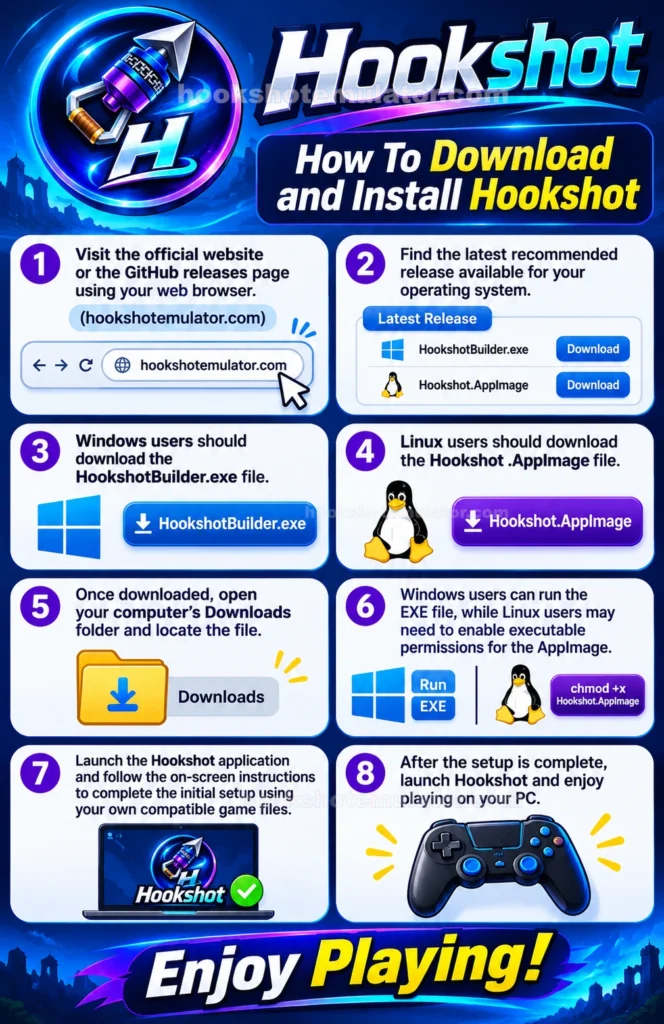
To download and install Hookshot, follow these simple steps:
- Visit the official website or the GitHub releases page using your web browser.
- Find the latest recommended release available for your operating system.
- Windows users should download the HookshotBuilder.exe file.
- Linux users should download the Hookshot .AppImage file.
- Once downloaded, open your computer’s Downloads folder and locate the file.
- Windows users can run the EXE file, while Linux users may need to enable executable permissions for the AppImage.
- Launch the Hookshot application and follow the on-screen instructions to complete the initial setup using your own compatible game files.
- After the setup is complete, launch Hookshot and enjoy playing on your PC.
How to Install and Set Up Hookshot
After downloading the correct builder for your operating system, you can start preparing Hookshot. The initial setup requires your own compatible copy of the Nintendo Switch 2 game.
Step 1: Prepare Your Game Files
- Make sure you have your own compatible copy of The Legend of Zelda: Ocarina of Time. Hookshot currently supports a specific game version, so check the official documentation before starting.
Step 2: Open the Hookshot Builder
- Run HookshotBuilder.exe on Windows or the downloaded AppImage on Linux. The builder will guide you through the preparation process.
Step 3: Select Your Game Files
- When prompted, provide the required game files. The application supports the appropriate .nup file or extracted romfs and exefs folders.
Step 4: Choose Your Settings
- Follow the builder’s instructions and select the available configuration options. Make sure you have enough free storage space before starting.
Step 5: Start the Building Process
- The builder will translate and compile the required game code and prepare the necessary PC components. This process may take some time depending on your computer’s hardware.
Step 6: Complete the Setup
- Once the build finishes successfully, the generated game files will be available on your computer. Keep the generated files and saves in their original locations unless you know how to move them safely.
Step 7: Launch Hookshot
- Open the generated game through its launcher and enjoy the adventure on your PC. You can access the in-game settings menu to adjust graphics, controls, and other supported options.
Note: The application does not provide game files or encryption keys. Always use your own compatible game copy and follow the official setup instructions.
FAQs
What is Hookshot?
Hookshot is an open-source static recompilation application that allows players to run the Nintendo Switch 2 version of The Legend of Zelda: Ocarina of Time natively on compatible Windows and Linux computers.
Is Hookshot free to download?
Yes. Hookshot is an open-source project available through GitHub. You still need your own compatible copy of the game.
Does Hookshot include the original game?
You don’t always have to go digging around manually. Many users note that you can conveniently update straight from the built-in launcher, making it quick and easy to grab the latest patches (like v2.0.11).
Can I use multiple save files?
No. Hookshot does not include the original game, keys, or copyrighted game files. You must provide your own compatible copy.
Can I use Hookshot on Steam Deck?
Yes. Hookshot provides Linux support, including Steam Deck. However, your device must meet the project’s hardware and software requirements.
What GPU do I need for Hookshot?
You need a Vulkan 1.3-compatible GPU with mesh shader support. The project lists NVIDIA RTX 20 series, AMD Radeon RX 6000 series, and Intel Arc as supported GPU families.
Does Hookshot support controllers?
Yes. Hookshot supports game controllers, allowing players to enjoy the game with a familiar gamepad setup.
Can I change graphics settings in Hookshot?
Yes. You can use the in-game settings menu to adjust available graphics, resolution, quality, and other supported options.
Does Hookshot support ultrawide monitors?
Yes. Hookshot offers support for different display formats, including ultrawide screens.
Conclusion
Hookshot is an interesting application for players who want to experience The Legend of Zelda: Ocarina of Time (Nintendo Switch 2 version) on a modern Windows or Linux computer. Its static recompilation approach makes it different from traditional emulators by converting the game’s code into a native PC application. With features such as customizable graphics, controller support, resolution options, and an in-game settings menu, it offers a flexible way to enjoy the adventure on compatible hardware.
Although Hookshot requires a supported game version, suitable PC hardware, and some time for the initial building process, it provides an exciting opportunity for fans who want to play on their computers. The application is still evolving, so players should check the official GitHub repository for the latest releases, compatibility information, and known issues before installing it. If you have your own compatible game copy and a supported PC, Hookshot is worth exploring.
Hookshot
Download Hookshot for Windows and Linux to play Zelda: Ocarina of Time on PC with native performance, Vulkan graphics, and customizable settings.
Price: 0.0
Price Currency: USD
Operating System: Windows, Linux
Application Category: Game
4.8